import tkinter as tk
from tkinter import messagebox
import random

class PythonGachaApp:
    def __init__(self, root):
        self.root = root
        self.root.title("10x9 자이언트 뽑기 (총 개수 조절 Ver)")

        # === 1. 카드 크기 및 레이아웃 설정 ===
        self.CARD_WIDTH = 40
        self.CARD_HEIGHT = 50
        self.PAD_SIZE = 5

        self.COLUMNS = 30
        self.MAX_ROWS = 100
        self.total_slots = self.COLUMNS * self.MAX_ROWS

        # 창 크기 설정
        screen_width = self.root.winfo_screenwidth()
        screen_height = self.root.winfo_screenheight()
        w = min(1200, screen_width - 50)
        h = min(900, screen_height - 100)
        self.root.geometry(f"{w}x{h}")

        # === 2. 뽑기 데이터 설정 ===
        self.stock_config = {
            "S급": {"name": "[S급] 전설의 검", "count": 1, "color": "#FFD700"},
            "A급": {"name": "[A급] 황금 갑옷", "count": 5, "color": "#FF4500"},
            "B급": {"name": "[B급] 은화 주머니", "count": 20, "color": "#1E90FF"},
            "C급": {"name": "[C급] 꽝", "count": 174, "color": "#333333"}
        }

        # 내부 변수
        self.waiting_pool = []
        self.current_board_items = {}
        self.opened_indices = []
        self.peeked_indices = []

        self.current_score = {"S급": 0, "A급": 0, "B급": 0, "C급": 0}

        # 게임 시작
        self.initialize_global_pool()
        self.setup_ui()
        self.start_next_round(initial=True)

    def initialize_global_pool(self):
        """설정된 개수대로 풀 생성"""
        self.waiting_pool = []
        for key, data in self.stock_config.items():
            self.waiting_pool.extend([key] * data["count"])
        random.shuffle(self.waiting_pool)
        self.current_score = {k: 0 for k in self.current_score}

    def get_total_remaining_count(self):
        """남은 전체 물량 계산"""
        unopened_on_board = len(self.current_board_items) - len(self.opened_indices)
        return len(self.waiting_pool) + unopened_on_board

    def setup_ui(self):
        # 상단 헤더
        top_frame = tk.Frame(self.root)
        top_frame.pack(fill="x", pady=5, padx=10)

        tk.Label(top_frame, text="[ 10x9 초대형 뽑기판 ]", font=("Malgun Gothic", 16, "bold")).pack(side="left")
        tk.Button(top_frame, text="⚙ 관리자 (개수 설정)", command=self.open_admin, bg="#555", fg="white").pack(side="right")

        # 정보 표시
        info_frame = tk.Frame(self.root)
        info_frame.pack(fill="x", pady=2)

        self.remain_label = tk.Label(info_frame, text="준비 중...", font=("Arial", 14, "bold"), fg="#DC143C")
        self.remain_label.pack()
        tk.Label(info_frame, text="※ Shift+휠(가로), 휠(세로) 또는 스크롤바를 이용해 이동하세요", font=("Arial", 9), fg="blue").pack()

        # 점수판
        score_frame = tk.Frame(self.root, bg="#eee", bd=2, relief="groove")
        score_frame.pack(fill="x", padx=10, pady=5)

        self.score_labels = {}
        grades = ["S급", "A급", "B급", "C급"]
        colors = ["#DAA520", "#FF4500", "#1E90FF", "#333"]

        for i, grade in enumerate(grades):
            lbl = tk.Label(score_frame, text=f"{grade[0]}: 0", font=("Arial", 11, "bold"), fg=colors[i], bg="#eee")
            lbl.pack(side="left", expand=True, fill="x")
            self.score_labels[grade] = lbl

        # 스크롤 캔버스
        canvas_container = tk.Frame(self.root)
        canvas_container.pack(fill="both", expand=True, padx=5, pady=5)

        self.canvas = tk.Canvas(canvas_container, bg="#333")

        v_scrollbar = tk.Scrollbar(canvas_container, orient="vertical", command=self.canvas.yview)
        h_scrollbar = tk.Scrollbar(canvas_container, orient="horizontal", command=self.canvas.xview)

        self.scrollable_frame = tk.Frame(self.canvas, bg="#333")

        self.scrollable_frame.bind(
            "<Configure>",
            lambda e: self.canvas.configure(scrollregion=self.canvas.bbox("all"))
        )

        self.canvas.create_window((0, 0), window=self.scrollable_frame, anchor="nw")
        self.canvas.configure(yscrollcommand=v_scrollbar.set, xscrollcommand=h_scrollbar.set)

        v_scrollbar.pack(side="right", fill="y")
        h_scrollbar.pack(side="bottom", fill="x")
        self.canvas.pack(side="left", fill="both", expand=True)

        # 90개 박스 생성
        self.box_buttons = []
        for i in range(self.total_slots):
            container = tk.Frame(self.scrollable_frame, width=self.CARD_WIDTH, height=self.CARD_HEIGHT, bg="#333")
            container.pack_propagate(False)

            r, c = divmod(i, self.COLUMNS)
            container.grid(row=r, column=c, padx=self.PAD_SIZE, pady=self.PAD_SIZE)

            btn = tk.Button(container, text=str(i+1), font=("Arial", 16, "bold"),
                            bg="#778899", fg="white", relief="raised",
                            command=lambda idx=i: self.on_box_click(idx))
            btn.place(relx=0, rely=0, relwidth=1, relheight=1)

            self.box_buttons.append((container, btn))

        # 하단 버튼
        ctrl_frame = tk.Frame(self.root)
        ctrl_frame.pack(fill="x", pady=10, padx=10)

        self.btn_open_all = tk.Button(ctrl_frame, text="👁 전체 열기 (소모X)",
                                      command=self.open_all_remaining,
                                      bg="#FF8C00", fg="white", font=("Malgun Gothic", 11, "bold"), height=2)
        self.btn_open_all.pack(fill="x", pady=3)

        sub_frame = tk.Frame(ctrl_frame)
        sub_frame.pack(fill="x")

        self.btn_shuffle = tk.Button(sub_frame, text="🔀 셔플 (안 깐것만)",
                                     command=self.shuffle_screen_only,
                                     bg="#9370DB", fg="white", font=("Malgun Gothic", 11, "bold"), height=2)
        self.btn_shuffle.pack(side="left", fill="x", expand=True, padx=2)

        self.btn_settle = tk.Button(sub_frame, text="💰 정산 (다음 라운드)",
                                    command=self.settle_and_next_round,
                                    bg="#2E8B57", fg="white", font=("Malgun Gothic", 11, "bold"), height=2)
        self.btn_settle.pack(side="right", fill="x", expand=True, padx=2)

    def update_ui_status(self):
        for grade, count in self.current_score.items():
            self.score_labels[grade].config(text=f"{grade[0]}: {count}")

        total_rem = self.get_total_remaining_count()
        self.remain_label.config(text=f"전체 남은 물량: {total_rem}개")

        if total_rem <= 0:
            self.remain_label.config(text="!!! 매진 (SOLD OUT) !!!", fg="red")

    def start_next_round(self, initial=False):
        if not initial:
            recycle_items = []
            for idx, item_key in self.current_board_items.items():
                if idx not in self.opened_indices:
                    recycle_items.append(item_key)
            self.waiting_pool.extend(recycle_items)
            random.shuffle(self.waiting_pool)

        draw_count = min(len(self.waiting_pool), self.total_slots)
        new_board_data = self.waiting_pool[:draw_count]
        self.waiting_pool = self.waiting_pool[draw_count:]

        self.current_board_items = {i: key for i, key in enumerate(new_board_data)}
        self.opened_indices = []
        self.peeked_indices = []

        if not initial:
            self.current_score = {k: 0 for k in self.current_score}

        self.update_ui_status()

        for i, (container, btn) in enumerate(self.box_buttons):
            if i < draw_count:
                btn.config(text=str(i+1), bg="#778899", state="normal", relief="raised",
                           fg="white", font=("Arial", 16, "bold"))
                btn.place(relx=0, rely=0, relwidth=1, relheight=1)
                container.grid()
            else:
                container.grid_remove()

    def on_box_click(self, idx):
        if idx in self.opened_indices or idx in self.peeked_indices: return

        self.opened_indices.append(idx)
        key = self.current_board_items[idx]
        data = self.stock_config[key]

        _, btn = self.box_buttons[idx]
        btn.config(state="disabled")

        self.current_score[key] += 1
        self.update_ui_status()

        self.animate_flip(idx, data, key, is_peek=False)

    def open_all_remaining(self):
        if not self.current_board_items: return
        count = 0
        for idx in range(len(self.current_board_items)):
            if idx not in self.opened_indices and idx not in self.peeked_indices:
                self.peeked_indices.append(idx)
                key = self.current_board_items[idx]
                data = self.stock_config[key]
                _, btn = self.box_buttons[idx]
                btn.config(state="disabled")
                self.animate_flip(idx, data, key, is_peek=True)
                count += 1
        if count > 0:
            messagebox.showinfo("전체 열기", f"{count}개의 카드를 오픈했습니다.\n(전체 물량은 감소하지 않았습니다)")

    def animate_flip(self, idx, data, grade_key, is_peek):
        _, btn = self.box_buttons[idx]
        total_steps = 10
        delay = 20

        def shrink(step):
            if step >= 0:
                current_width = step / total_steps
                current_x = (1.0 - current_width) / 2
                btn.place(relx=current_x, rely=0, relwidth=current_width, relheight=1)
                self.root.after(delay, shrink, step - 1)
            else:
                text_show = grade_key
                if grade_key == "C급": text_show = "꽝"

                bg_color = "white" if not is_peek else "#F0F0F0"
                font_size = 22

                btn.config(bg=bg_color, disabledforeground=data["color"],
                           text=text_show, relief="sunken", font=("Arial", font_size, "bold"))
                expand(1)

        def expand(step):
            if step <= total_steps:
                current_width = step / total_steps
                current_x = (1.0 - current_width) / 2
                btn.place(relx=current_x, rely=0, relwidth=current_width, relheight=1)
                self.root.after(delay, expand, step + 1)
            else:
                if not is_peek and "S급" in data["name"]:
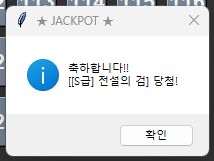
                     messagebox.showinfo("★ JACKPOT ★", f"축하합니다!!\n[{data['name']}] 당첨!")

        shrink(total_steps)

    def shuffle_screen_only(self):
        if not self.current_board_items: return
        surviving_items = []
        for idx, item_key in self.current_board_items.items():
            if idx not in self.opened_indices:
                surviving_items.append(item_key)
        random.shuffle(surviving_items)

        self.current_board_items = {i: k for i, k in enumerate(surviving_items)}
        self.opened_indices = []
        self.peeked_indices = []

        for i, (container, btn) in enumerate(self.box_buttons):
            if i < len(surviving_items):
                btn.config(text=str(i+1), bg="#778899", state="normal", relief="raised",
                           fg="white", font=("Arial", 16, "bold"))
                btn.place(relx=0, rely=0, relwidth=1, relheight=1)
                container.grid()
            else:
                container.grid_remove()

        self.update_ui_status()
        orig_title = self.root.title()
        self.root.title("🔀 셔플 완료! (남은 것만)")
        self.root.after(1000, lambda: self.root.title(orig_title))

    def settle_and_next_round(self):
        msg = "[ 라운드 정산 결과 ]\n"
        found = False
        for grade, count in self.current_score.items():
            if count > 0:
                msg += f"{grade} : {count}개\n"
                found = True
        if not found: msg += "(획득한 아이템 없음)\n"

        rem = self.get_total_remaining_count()
        msg += f"\n확인을 누르면 다음 라운드로 진행합니다.\n(전체 남은 물량: {rem}개)"

        messagebox.showinfo("정산 완료", msg)

        if rem <= 0:
             for _, btn in self.box_buttons:
                 btn.config(state="disabled", bg="#111", text="끝")
        else:
            self.start_next_round(initial=False)

    def open_admin(self):
        """[업그레이드된 관리자 설정]"""
        win = tk.Toplevel(self.root)
        win.title("관리자 설정")
        win.geometry("320x450")

        tk.Label(win, text="[ 물량 상세 설정 ]", font=("bold", 14)).pack(pady=10)
        tk.Label(win, text="* C급은 (총 개수 - S/A/B)로 자동 계산됩니다.", fg="blue", font=("Arial", 9)).pack()

        f = tk.Frame(win)
        f.pack(pady=10)

        # 1. S, A, B 입력창
        entries = {}
        target_grades = ["S급", "A급", "B급"]

        for i, grade in enumerate(target_grades):
            tk.Label(f, text=f"{grade} 개수:", font=("Arial", 11)).grid(row=i, column=0, pady=5, sticky="e")
            e = tk.Entry(f, width=10, font=("Arial", 11))
            e.insert(0, self.stock_config[grade]["count"])
            e.grid(row=i, column=1, padx=10)
            entries[grade] = e

        # 2. 총 개수 입력창
        current_total = sum(d["count"] for d in self.stock_config.values())

        tk.Label(f, text="-----------------").grid(row=3, column=0, columnspan=2)

        tk.Label(f, text="전체 총 개수:", font=("Arial", 11, "bold")).grid(row=4, column=0, pady=5, sticky="e")
        total_entry = tk.Entry(f, width=10, font=("Arial", 11, "bold"), bg="#FFFACD")
        total_entry.insert(0, current_total)
        total_entry.grid(row=4, column=1, padx=10)

        def save_and_reset():
            try:
                # 입력값 가져오기
                s_count = int(entries["S급"].get())
                a_count = int(entries["A급"].get())
                b_count = int(entries["B급"].get())
                total_count = int(total_entry.get())

                if s_count < 0 or a_count < 0 or b_count < 0 or total_count <= 0:
                    raise ValueError("음수는 입력할 수 없습니다.")

                # C급 자동 계산
                c_count = total_count - (s_count + a_count + b_count)

                if c_count < 0:
                    messagebox.showerror("오류", f"총 개수가 너무 적습니다!\nS+A+B 합계: {s_count+a_count+b_count}개\n입력한 총 개수: {total_count}개")
                    return

                # 설정 적용
                self.stock_config["S급"]["count"] = s_count
                self.stock_config["A급"]["count"] = a_count
                self.stock_config["B급"]["count"] = b_count
                self.stock_config["C급"]["count"] = c_count

                # 게임 리셋
                self.initialize_global_pool()
                self.start_next_round(initial=True)

                info_msg = (f"설정 완료!\n\n"
                            f"S급: {s_count}\n"
                            f"A급: {a_count}\n"
                            f"B급: {b_count}\n"
                            f"C급(자동): {c_count}\n"
                            f"----------------\n"
                            f"총 합계: {total_count}")

                messagebox.showinfo("리셋 완료", info_msg)
                win.destroy()

            except ValueError:
                messagebox.showerror("오류", "유효한 숫자를 입력하세요.")

        tk.Button(win, text="저장 및 게임 리셋", command=save_and_reset, bg="#DC143C", fg="white", height=2).pack(pady=20, fill="x", padx=30)

if __name__ == "__main__":
    root = tk.Tk()
    app = PythonGachaApp(root)
    root.mainloop()
이치방쿠지를 컴퓨터에서 구현해보기...
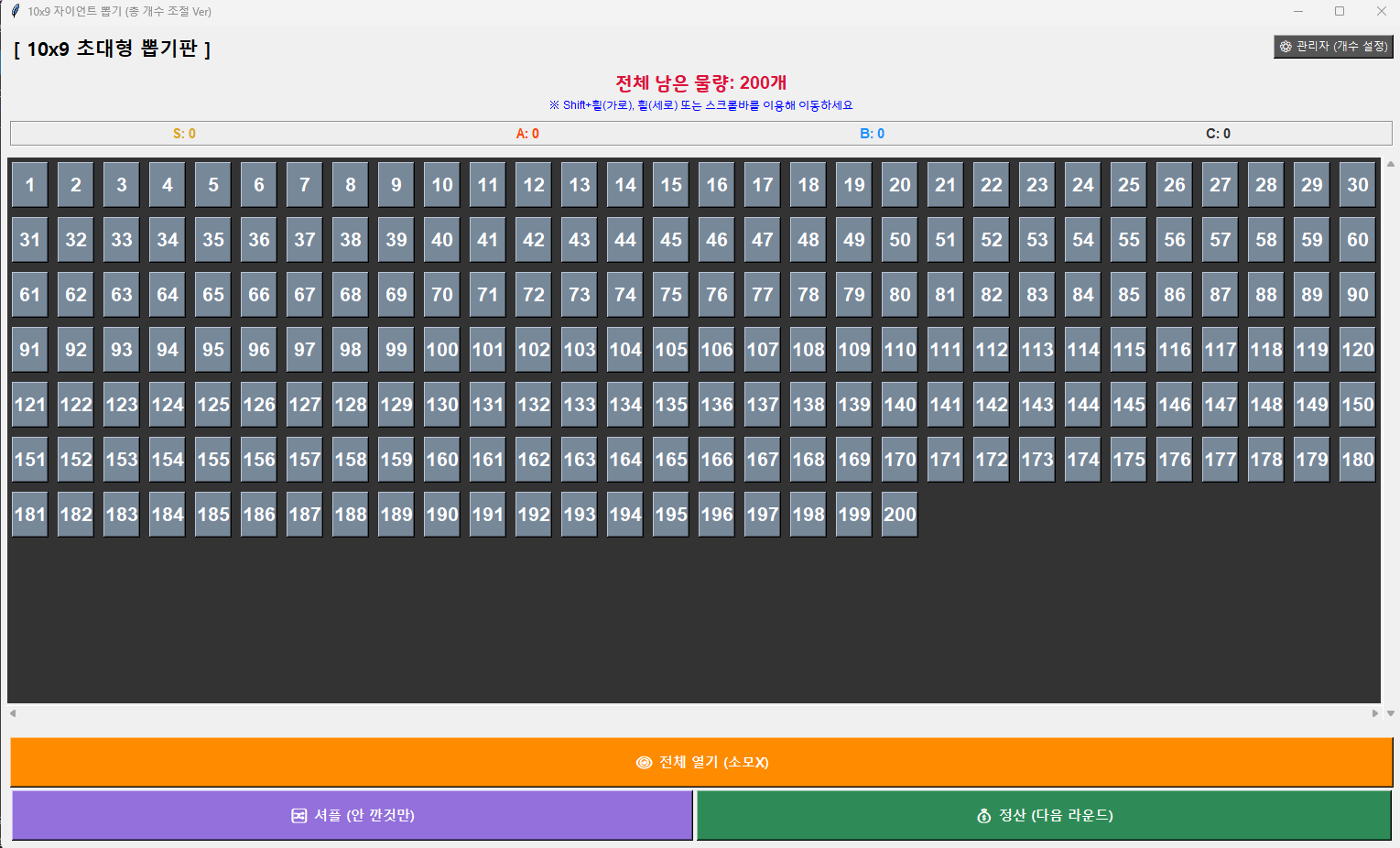
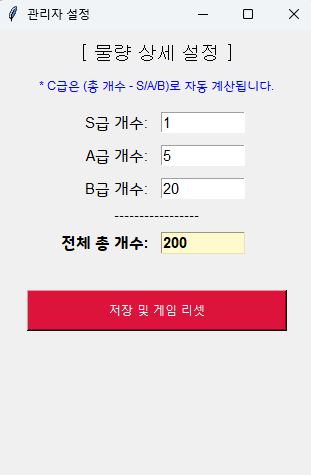
가로세로 크기랑 한번에 나열하는 개수 조절하는 라인
        # === 1. 카드 크기 및 레이아웃 설정 === 10~17
        self.CARD_WIDTH = 40
        self.CARD_HEIGHT = 50
        self.PAD_SIZE = 5

        self.COLUMNS = 30
        self.MAX_ROWS = 100
        self.total_slots = self.COLUMNS * self.MAX_ROWS
이제 구현도 AI가 해주니까 남은건 디자인뿐인데 진짜 그거야말로 나한테 없는 재능...
'심심해서 찔러보는 IT' 카테고리의 다른 글
| 위시캣PRD활용 - 영작첨삭 플랫폼 (0) | 2026.03.10 |
|---|---|
| 티스토리 자동 목차 및 이동링크 (0) | 2026.03.09 |
| 바이브 코딩으로 구상한 도메인 만들기 (0) | 2026.03.04 |
| 블로그내 하이퍼링크 만들기 (0) | 2026.02.23 |
| 온라인 뽑기 만들기(가챠편) (0) | 2026.02.11 |